When someone asks me “where does this number come from?”, I have two possible answers.
The first is to open the code, manually trace which job read from which table, work out which transformations were applied, and walk back to the source. In pipelines with 20 steps, that can take hours.
The second is to open Unity Catalog, click on the column in question, and see the full graph: source, transformations, intermediate tables, destination. In seconds.
That difference is what lineage solves in practice. But Unity Catalog doesn’t capture everything automatically. Understanding what it covers and what needs extra work is what separates a real implementation from one that gives a false sense of security.
What Unity Catalog captures automatically
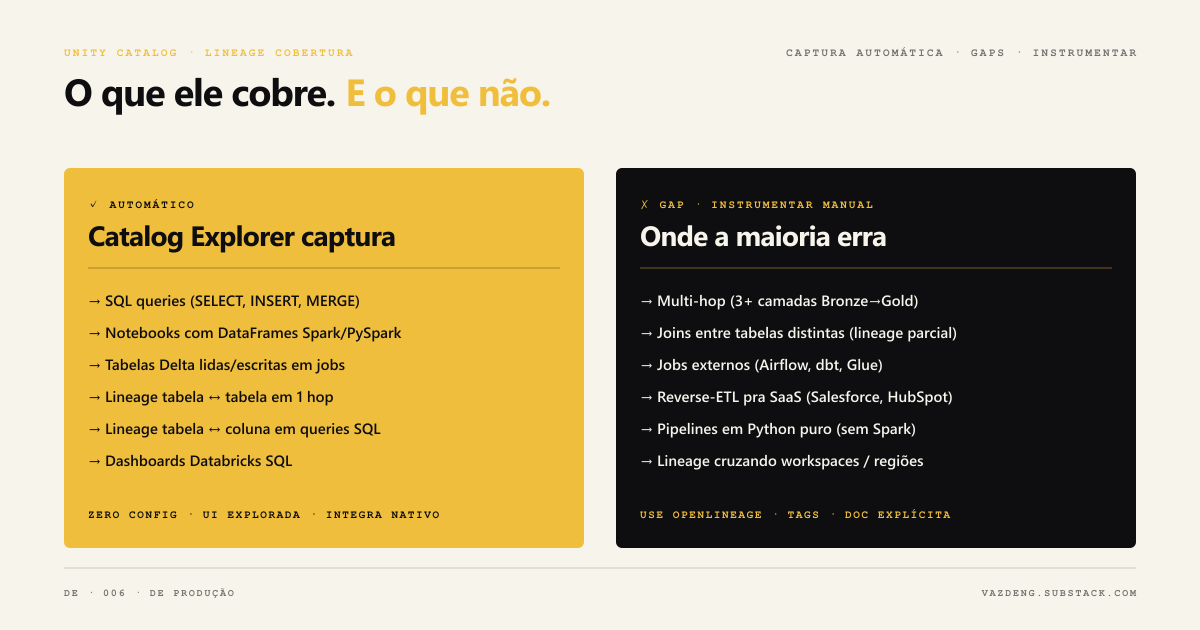
Unity Catalog intercepts Spark execution plans at runtime and registers every read and write on metastore tables. No extra code configuration required.
Table lineage works for any SELECT, CREATE TABLE AS SELECT, INSERT INTO SELECT operation in any language: Python, SQL, Scala, R. For each operation, the system records which table was read, which was written, in which job, in which notebook, by which user, at what time.
Column lineage goes further: it maps which source columns feed which destination columns. Lineage of streaming between Delta tables requires DBR 11.3 LTS or above; column lineage in Delta Live Tables (declarative pipelines) requires 13.3 LTS or above.
This information is accessible two ways: via Catalog Explorer with a visual interface, and via the system tables system.access.table_lineage and system.access.column_lineage for those who need it programmatically.
What isn’t captured and where most people get it wrong
The official docs are clear but discreet about the limitations. I’ve seen these limitations bite in production more than once.
UPDATE, DELETE, and INSERT VALUES don’t generate lineage edges. This is the most critical limitation for anyone working with CDC, SCD Type 2, or any pipeline with in-place updates. The data was modified, but Unity Catalog doesn’t record that relationship.
MERGE INTO doesn’t capture lineage by default. It can be enabled with spark.databricks.dataLineage.mergeIntoV2Enabled, but it requires explicit configuration on each cluster or job.
RDDs aren’t supported. The Unity Catalog API doesn’t work with RDDs, so any pipeline using Spark’s low-level API stays completely outside tracking.
Renamed objects lose history permanently. If you rename a table, schema, or catalog, historical lineage breaks. There’s no automatic migration of the graph when the object changes name.
JDBC connections bypass entirely. Data read or written via JDBC doesn’t pass through Unity Catalog’s capture mechanism.
Path-referenced tables (s3://…) don’t capture column lineage. Table lineage via path works, but column mapping doesn’t.
And a practical detail: system tables only have data starting September 2024. If you need lineage history before that date, it doesn’t exist in the system tables.
Multi-hop lineage: what Catalog Explorer doesn’t show
The Catalog Explorer visualizer shows only one hop in each direction: one upstream table and one immediate downstream table. If the data went through five transformations, you only see the adjacent one.
To trace the full chain, the approach is iterative queries on the system tables:
-- Find all ancestors of a table (multi-hop)
WITH RECURSIVE lineage AS (
  SELECT source_table_name, target_table_name, 1 as hop
  FROM system.access.table_lineage
  WHERE target_table_name = 'my_gold_table'

  UNION ALL

  SELECT l.source_table_name, tl.target_table_name, lineage.hop + 1
  FROM system.access.table_lineage tl
  JOIN lineage l ON tl.target_table_name = l.source_table_name
)
SELECT * FROM lineage ORDER BY hop;
Databricks doesn’t support native recursive CTE on system tables. In practice, this needs iterative logic in Python that queries level by level.
OpenLineage as a complement
For pipelines that leave the Databricks ecosystem (Airflow orchestrating external jobs, dbt running on a different warehouse, Python scripts with pandas), OpenLineage is the most used alternative to unify cross-platform lineage.
OpenLineage integrates via OpenLineageSparkListener and captures lineage from S3, GCS, JDBC, Redshift, and BigQuery. The integration exists, but has documented bugs with Databricks Spark 3.4+: generated payloads sometimes contain only inputs without outputs, and there are incompatibilities between the OpenLineage Spark 3.3 agent and Databricks’ 3.4.1 implementation.
If OpenLineage is critical to your setup, verify version compatibility before going to production.
What to instrument manually
To have complete lineage in real pipelines, these are the gaps that need extra work:
BI tools (Tableau, Power BI, Looker) need an explicit connector or manual registration via the External Lineage API, which is in Public Preview. The limit is 10,000 external objects and 100,000 relationships per metastore.
External orchestrators (Airflow, Prefect) need integration via API so jobs appear in the lineage graph.
Pipelines with extensive UPDATE/DELETE need complementary logging via system.query.history for auditing, since automatic lineage doesn’t cover those operations.
Where to start from scratch
If you’re instrumenting lineage for the first time in a Databricks environment:
First, confirm that clusters and jobs are in workspaces with Unity Catalog enabled. Without it, no automatic capture works.
Second, validate Databricks Runtime: lineage of streaming between Delta tables requires DBR 11.3 LTS or above; column lineage in Delta Live Tables (declarative pipelines) requires 13.3 LTS or above. Older projects running on runtimes below that won’t have column lineage even with Unity Catalog active.
Third, map which pipelines extensively use UPDATE/DELETE/MERGE. For those, define from the start what the complementary auditing strategy will be, whether via system.query.history or via explicit logging in code.
Fourth, build a validation query that runs weekly against the system tables and checks whether critical tables have lineage registered. Missing lineage on an important table is a sign that something fell outside capture scope.
Lineage isn’t a feature you turn on and forget. I use it as a continuous practice: for every new pipeline, I validate what Unity Catalog captured and what fell outside.
What part of lineage gives you the most trouble today? Tell me on LinkedIn or subscribe to the newsletter.