
It was 2 a.m. when the alert came. The monthly report DAG had failed on step 8 of 12. Financial data, 6 a.m. deadline, and I spent the next 4 hours trying to understand if the task really failed, if it was a silent timeout, or if the worker had died without telling anyone. When I found out it was the third, 40 minutes were left.
This scenario is routine in teams running Airflow in production. Airflow works. And it also creates work nobody warns you about in the first tutorial.
This post is not to convince anyone to drop Airflow. It is about what is worth changing before the problem shows up.
Context: what it is and who uses it
Airflow was created by Maxime Beauchemin at Airbnb in October 2014 to orchestrate data pipelines with complex dependencies. It went open source in June 2015 and became an Apache Foundation top-level project in January 2019.
It is today the most used data orchestrator in the world: 320 million downloads in 2024 alone, by far the most downloaded orchestrator. Uber runs 200,000 pipelines with 750,000 task runs per day. Shopify has 10,000 active DAGs. Stripe orchestrates 250 pipelines totaling 150,000 tasks.
Real adoption, not hype.
But the same report that shows those numbers, Astronomer’s State of Airflow, also reveals that 46% of users say that when Airflow has a problem, the entire operation stops. That is the tension nobody tells you about in the first tutorial.
What Airflow solves well
Dependencies between tasks are guaranteed. You define the graph in Python. Airflow guarantees that task B only runs when task A finishes successfully. With 50 interdependent tasks in a finance pipeline, having that guaranteed by an orchestrator avoids rewriting retry and dependency logic in every DAG, and removes the whole category of “task ran before time because cron fired” bugs.
Retry with backoff is native. Two lines and your task retries automatically. In pipelines depending on unstable external APIs, this kills 2 a.m. alerts for transient errors.
The execution history is auditable. Every run, every task, every log gets recorded. When compliance asks “was the March report generated with data from 03/31 or 04/01”, you open Airflow and answer in seconds.
Backfill works. Pipeline down for three days? You reprocess the historical runs with one command. For pipelines that need complete and consistent history, that matters.
Where Airflow gets complicated
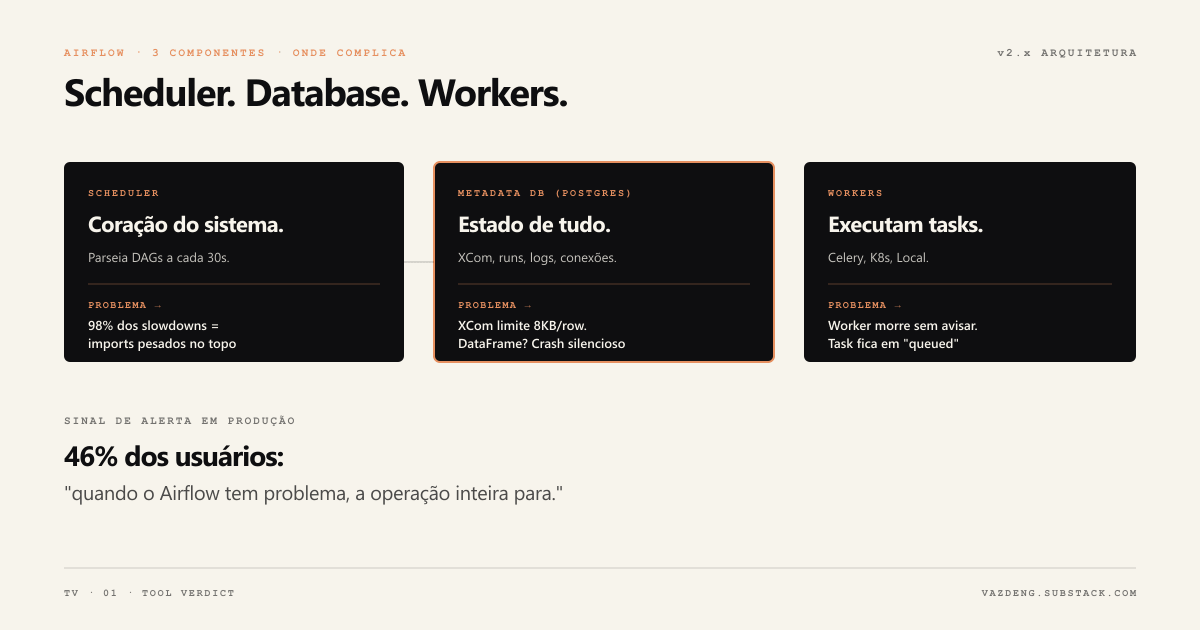
The scheduler parses your whole code every 30 seconds
The scheduler needs to run the Python code of each DAG file repeatedly to understand what exists and what the dependencies are. With 200 DAGs, that parse cycle can take minutes.
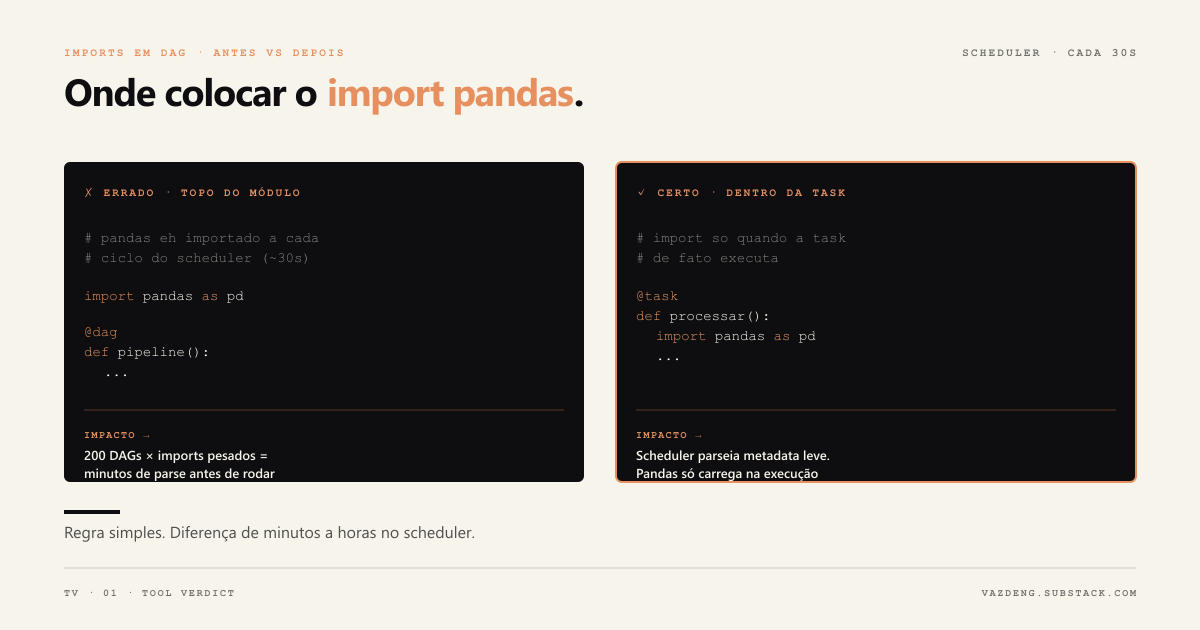
What makes it critical: heavy module-level imports are by far the most common cause of scheduler slowness. A file that does import pandas as pd at the top, outside any function, makes the scheduler run that import every cycle. With 200 DAGs and heavy imports, that becomes minutes of parsing before any task runs.
# Wrong: pandas is imported every scheduler cycle
import pandas as pd

@dag
def pipeline():
    ...

# Right: import only when the task runs
@task
def process():
    import pandas as pd
    ...
XCom has a hard limit nobody warns you about
XCom is Airflow’s mechanism for tasks to communicate. The problem: it was designed for small messages, not data.
XCom is stored in the metadata database and, although Postgres accepts large values (up to ~1GB via TOAST), the recommended practical ceiling is tens of KB. Passing a whole DataFrame degrades the database. In production, the symptom shows up as a slow or stressed metadata database, not as a clear “data too big” message.
The production solution: pass only the S3 path via XCom, never the data itself.
catchup=True has already triggered unwanted backfills in many teams
By default in old versions, if you redeploy a DAG with start_date in the past and catchup=True, Airflow will create and try to execute every historical run since start_date. With a monthly DAG and start_date two years ago, that is 24 runs fired at once.
DoubleVerify documented on their engineering blog that after migrating to a setup with catchup=False as the cluster default and other changes, incidents dropped 80%.
Renaming a DAG loses the whole history
There is no rename operation in Airflow. Renaming a DAG creates a new entry in the metadata database and loses the whole execution history. In production, that means you cannot compare current behavior to past behavior, and any alert that depends on history breaks.
Business logic inside the operator becomes a problem later
The temptation is to put transformations and business rules directly inside PythonOperator. Works in the beginning. After six months, you have untestable logic stuck inside infrastructure, the same rule duplicated across three different operators, and a DAG you can only debug by bringing up the whole Airflow.
The right pattern: the operator is infrastructure and calls testable functions that live outside the DAG.

What I would do differently
TaskFlow API from day one. Released in Airflow 2.0, it lets you write DAGs with Python decorators instead of instantiating operators manually. The code is cleaner, dependencies are implicit in the flow, and it is easier to test. I spent too long writing in the old style before migrating.
catchup=False as the cluster default from initial configuration. One line in airflow.cfg that avoids dozens of incidents.
Resource pools from the first DAG. By default Airflow does not limit how many tasks of a DAG run in parallel. A heavy DAG can consume all the slots and block the others. Configure pools before the first problem, not after.
No multi-tenant on a single instance. Sharing one Airflow instance between different teams creates Python dependency conflicts, lack of resource isolation, and upgrade paralysis: one team cannot update without coordinating with all the others. One instance per team is the recommended pattern.
Monitor the scheduler, not just the tasks. The scheduler is the heart of Airflow and can degrade silently. Grafana on the scheduler heartbeat catches problems before the tasks start failing.
About Airflow 3.0
In April 2025 Airflow released version 3.0, the biggest release in the project’s history. It solves problems the community documented for years: Task Execution API that removes the need for workers to access the metadata database directly, native DAG Versioning, rebuilt React UI, and support for tasks in languages beyond Python.
If you are starting a new project, evaluate Airflow 3.0 before picking the version to install. The changes are breaking, so migrating an existing cluster takes planning.
When to evaluate alternatives
Airflow has 320 million downloads for a reason: it works, has the biggest integration ecosystem in the market, and the community is vast.
But there are cases where other tools solve it better:
Prefect or Dagster for smaller teams that value simple local development, event-driven workflows, and richer observability without the operational overhead of Airflow.
dbt Cloud when most pipelines are SQL transformations in a warehouse. Native orchestration is simpler for that specific case.
Managed Airflow (Astronomer, Amazon MWAA, Google Cloud Composer) if the cost fits and you do not want to maintain the infrastructure. Removes a significant chunk of the operational pain.
What does not pay off is picking by popularity without evaluating whether the problem Airflow solves is your problem.
What stays
Airflow works well for what it was made for: orchestrating batch pipelines with complex dependencies, auditable history and reliable retries.
The problems I ran into were almost all avoidable with the right configuration from the start: imports outside functions, XCom for big data, catchup without control, business logic inside operators.
If you are starting: imports inside functions, catchup=False on the cluster, XCom only for coordination, business logic in separate testable modules. Four decisions that avoid most of the problems I ran into.
What was the most annoying problem you have seen with Airflow? Tell me on LinkedIn or subscribe to the newsletter.